> For the complete documentation index, see [llms.txt](https://docs.flash.im/llms.txt). Markdown versions of documentation pages are available by appending `.md` to page URLs; this page is available as [Markdown](https://docs.flash.im/docs/api-reference/match-api.md).

# Match API

Send what your page is about; get the news that fits.

{% hint style="info" %}
`GET /v1/news?sentence=...` or `?keyword=...` · header `Authorization: Bearer sk_live_...` · one query per request · items carry the News Item Fields schema
{% endhint %}

## Purpose

Send what your page is about; FLASH returns the news that belongs next to it. This is the core of the FLASH API: one call attaches a live, relevant news feed to any contract, asset, or topic page you run. **There is nothing to design on your side: the request is the metadata your platform already holds.**

**Match is not a separate endpoint.** It is the matching mode of the News Feed endpoint: add `sentence` or `keyword` to `GET /v1/news` and the feed becomes a match for that one page. One request = one query, and responses are served from cache, so per-page requests stay cheap.

<figure><img src="https://2934076593-files.gitbook.io/~/files/v0/b/gitbook-x-prod.appspot.com/o/spaces%2F7M9iZ2Kg8fDpH37gsTL3%2Fuploads%2FzIP3eDqt3uZQpgCiD56b%2FTERMINAL-Nvidia-match.png?alt=media&#x26;token=5222fa9a-6c43-499b-8cf5-77d86e9f826c" alt="The two search fields in FLASH Terminal"><figcaption><p>The search inside FLASH Terminal is this API (Nvidia)</p></figcaption></figure>

<figure><img src="https://2934076593-files.gitbook.io/~/files/v0/b/gitbook-x-prod.appspot.com/o/spaces%2F7M9iZ2Kg8fDpH37gsTL3%2Fuploads%2FuZhIB2N8nQNaTGUwzgXb%2FTERMINAL-oil-match.png?alt=media&#x26;token=eda7de06-2795-425a-9288-56b06ceedbe2" alt=""><figcaption><p>The search inside FLASH Terminal is this API (Oil)</p></figcaption></figure>

<a href="https://app.flash.im/terminal" class="button primary">Try it in Terminal</a>

## Matching is by entity, not by string

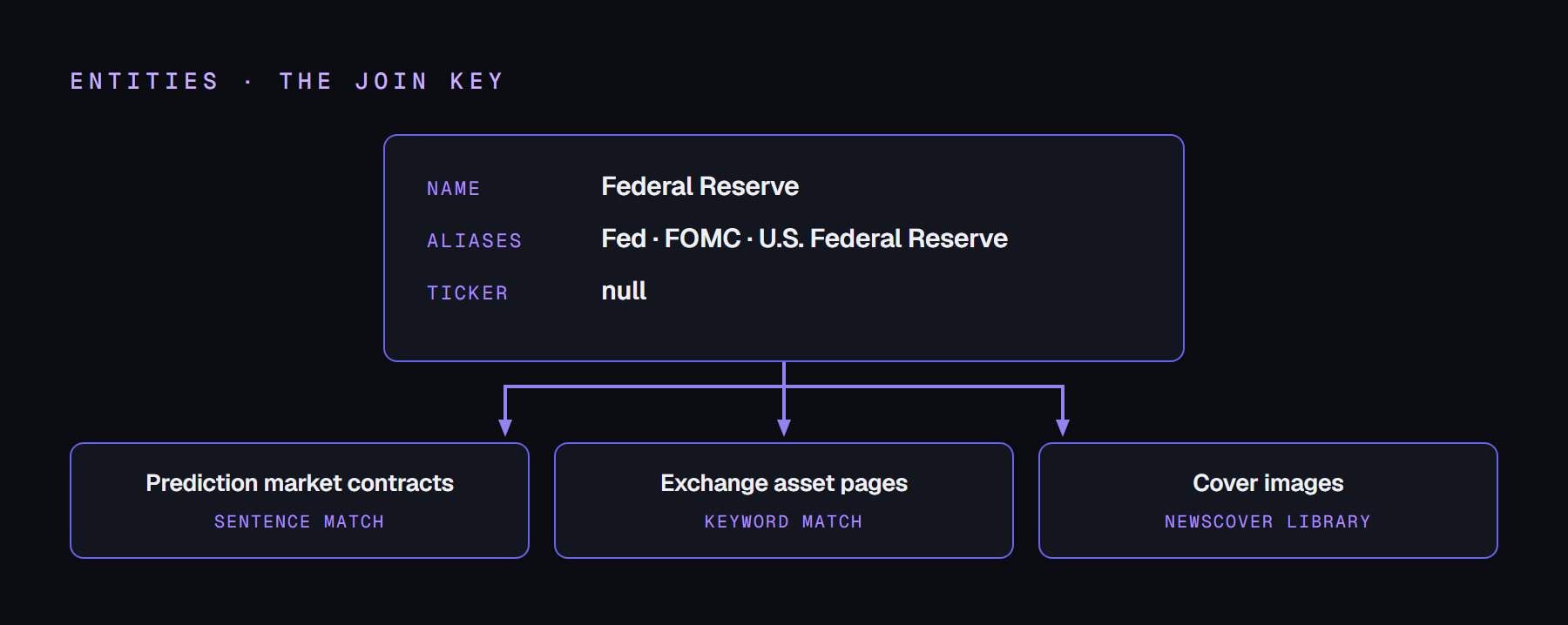
At analysis time our AI extracts each article's entities in three layers (full name, aliases, ticker), and your input is checked against all three. Matching runs on those three layers only; the sentiment fields on an entity are never used to match. That is why `BTC` and `Bitcoin` resolve to the same entity, and an article that only says "Fed" still matches "Federal Reserve".

Matching needs a specific entity. A story that shares only a very general name with your sentence (a head of state or a country on its own) is not treated as a match; the candidate, company, or asset names in the sentence or in `subEntities` are what carry a query.

<figure><img src="https://2934076593-files.gitbook.io/~/files/v0/b/gitbook-x-prod.appspot.com/o/spaces%2F7M9iZ2Kg8fDpH37gsTL3%2Fuploads%2F1fb945ZzICeeq5CNxCP4%2Fentities-join.png?alt=media" alt="entities as the join key"><figcaption></figcaption></figure>

## Two query modes, one endpoint

The parameter name selects the mode.

<table data-card-size="large" data-view="cards"><thead><tr><th></th><th></th><th></th></tr></thead><tbody><tr><td><h4><i class="fa-quote-left" style="color:$primary;">:quote-left:</i></h4></td><td><h4>Sentence mode</h4><p>Parameter <code>sentence</code></p></td><td>Send a sentence such as a contract question, unchanged (URL-encoded). The engine pulls the entities out of it. Best for prediction market contract pages.</td></tr><tr><td><h4><i class="fa-tags" style="color:$primary;">:tags:</i></h4></td><td><h4>Keyword mode</h4><p>Parameter <code>keyword</code></p></td><td>Send up to 30 keywords you selected, comma-separated. Best for trading panels and asset info pages.</td></tr></tbody></table>

Exactly one of `sentence` or `keyword` per request (both = 400 error). **Send tickers in upper case** (`BTC`, not `btc`): a lower-case ticker reads as an ordinary word, so normalizing your input to lower case breaks ticker matching. Full names are case-insensitive. **One request = one query**; running thousands of contracts or assets is fine, each page simply makes its own call and identical URLs are served from cache. **Inputs must be in English** (`sentence`, `keyword`, `subEntities`). Output articles can be in any of the 16 languages via `lang`.

## Usage patterns

**There is nothing to design on your side.** The metadata your platform already holds is the request. A listing row already carries a name and a ticker; a contract page already carries its question, its outcomes, and the timestamp it stops trading. Send them as-is, and the news that belongs on that page comes back.

One complete call per mode; swap in your own input and `category` (`crypto`, `economy`, `politics`, `geopolitics`, or several comma-separated):

```bash
curl "https://api.flash.im/v1/news?sentence=Will%20Bitcoin%20hit%20%24150%2C000%20by%202026%3F&category=crypto&limit=5" \
  -H "Authorization: Bearer sk_live_..."
```

```bash
curl "https://api.flash.im/v1/news?keyword=Bitcoin,BTC&category=crypto&limit=5" \
  -H "Authorization: Bearer sk_live_..."
```

### Exchange

Template:

```
GET /v1/news?keyword={asset name},{ticker}&category={crypto|economy}&fields={fields}&limit={count}
```

What your listing already holds is the query:

| You already have    | You send                                                                                                                                                                                                       |
| ------------------- | -------------------------------------------------------------------------------------------------------------------------------------------------------------------------------------------------------------- |
| Asset name + ticker | `keyword={asset name},{ticker}` (send the ticker in upper case)                                                                                                                                                |
| The asset's market  | `category=crypto` for crypto assets, `category=economy` for listed equities. FLASH has four categories; asset listings use these two. A crypto stock such as Coinbase can take both: `category=crypto,economy` |
| The panel's width   | `fields=` and `limit=`                                                                                                                                                                                         |

Filled in:

```
GET /v1/news?keyword=Bitcoin,BTC&category=crypto&fields=headline,impact,publishedAt&limit=5
GET /v1/news?keyword=Nvidia,NVDA&category=economy&fields=headline,impact,publishedAt&limit=5
GET /v1/news?keyword=Tesla,TSLA&category=economy&fields=headline,impact,publishedAt&limit=5
```

Three fields per row render the "why did the price move" context beside the chart: headline, dots, time. For a full news tab, drop `fields` and raise `limit`.

### Prediction market

Template:

```
GET /v1/news?sentence={event title}&category={category}&subEntities={outcome 1},{outcome 2}&before={cutoff}&limit={count}
```

**Send the outcome names in `subEntities` whenever the title itself does not name them.** Matching runs on specific entities, so the candidate, company, or asset names are what carry a contract query; a title that names none returns `no_match` without them.

A real Kalshi event, mapped field by field. Every value below already sits in your contract data:

| Kalshi already has               | Value                                          | You send                                           |
| -------------------------------- | ---------------------------------------------- | -------------------------------------------------- |
| `event.title`                    | 2028 Republican presidential nominee           | `sentence=` (as-is, URL-encoded)                   |
| Sibling markets' `yes_sub_title` | J.D. Vance · Marco Rubio · Ron DeSantis        | `subEntities=`                                     |
| `event.category`                 | Elections                                      | `category=politics` (the FLASH category)           |
| `markets[].close_time`           | 2028-11-07T15:00:00Z                           | `before=` (already ISO 8601 UTC: copy it)          |
| Series / Event / Market tickers  | KXPRESNOMR / KXPRESNOMR-28 / KXPRESNOMR-28-JDV | **Not sent.** The URL itself is the query identity |

Filled in:

```
GET /v1/news?sentence=2028%20Republican%20presidential%20nominee&category=politics&subEntities=J.D.%20Vance,Marco%20Rubio,Ron%20DeSantis&before=2028-11-07T15:00:00Z&limit=5
```

* **Query at the event level, render on every market page.** Sibling markets of one event (KXPRESNOMR-28-JDV, -MR, -RDS) call the identical URL, share the cache, and show the same race news
* Kalshi's category is Elections; on FLASH that is `category=politics`
* This event title names no candidate, so `subEntities` is what the matching runs on. Take the values from the sibling markets' `yes_sub_title`
* Leave `before=` in the URL from the start: until that timestamp it returns the latest matched news, and once the timestamp passes the list stops moving on its own and becomes the contract's record

### Data provider

Template:

```
GET /v1/news?keyword={asset name},{ticker}&category={crypto|economy}&lang={language}&limit={count}
```

The asset page's own identity is the query, and the user's locale is the only other input. Filled in:

```
GET /v1/news?keyword=Ethereum,ETH&category=crypto&lang=en&limit=10
GET /v1/news?keyword=Microsoft,MSFT&category=economy&lang=en&limit=10
GET /v1/news?keyword=Google,Alphabet,GOOG&category=economy&lang=en&limit=10
```

* The GOOG row shows the backup pattern: up to 30 keywords, spellings of the same entity merge, so send every spelling your listing carries (Google, Alphabet, GOOG) and whichever is registered will match
* Serve every locale from the same integration: swap `lang=en` for any of the 16 languages, nothing else changes. Send an exact code such as `zh-CN`: anything the API does not recognise falls back to English with no error
* Mid-tier assets often match fewer stories than your `limit`: render the `fallback` items under a "Market News" label so the section never sits empty

### At scale: a whole listing

**One row, one request.** Each row sends its own name and ticker, whenever the listing renders. Use it where every row shows its own news.

```
GET /v1/news?keyword=Bitcoin,BTC&category=crypto&limit=3
GET /v1/news?keyword=Ethereum,ETH&category=crypto&limit=3
... one request per row
```

Identical URLs are served from cache, so a large listing stays cheap; for very long listings, request only the rows in view (lazy-load) as the user scrolls.

**One block, one request.** When a single surface covers a set of assets at once (a watchlist, a sector tab, a portfolio summary), send them together: `keyword` takes up to 30 values and matches them as a union.

```
GET /v1/news?keyword=Bitcoin,BTC,Ethereum,ETH,Solana,SOL,XRP,Cardano,ADA&category=crypto&limit=20
```

Thirty values cover about fifteen assets when you send a name and a ticker for each. What comes back is one newest-first list across the whole set, so use this shape where the block is about the set rather than about one row.

A server-side pipeline can poll either shape with `after` to receive only what is new (see Integration Patterns).

## Which mode, with which input

**Sentence mode: pass the page title as-is.** No keyword extraction on your side; the engine pulls the entities out of the sentence. URL-encode the text (spaces as `%20`); HTTP libraries do this automatically.

```
GET /v1/news?sentence=Will%20Bitcoin%20hit%20%24150%2C000%20by%202026%3F&category=crypto
```

**Keyword mode: you pick the terms.** For asset pages, the standard pattern is **`["<asset name>", "<ticker>"]`**:

```
GET /v1/news?keyword=Bitcoin,BTC&category=crypto
```

Picking keywords:

* **Send both the name and the ticker.** Your input is checked against all three entity layers, and spellings of the same entity merge into one result: sending both forms raises the hit rate, and the same story never comes back twice
* **Tickers in upper case.** `BTC`, not `btc`. A lower-case ticker is read as an ordinary word, so do not normalize your keywords to lower case. Full names are case-insensitive
* **Up to 30 keywords.** Use the spare slots for other spellings your listing carries (the backup pattern: whichever is registered will match), or for a whole set of assets that share one block
* **Proper names and tickers only.** Generic words (`price`, `token`, `market crash`) are not entities and will not match

**A contract with everything on.** A multi-choice political contract sends the question plus the candidate names (`subEntities`) and the cutoff timestamp (`before`):

```
GET /v1/news?sentence=Who%20will%20win%20the%202028%20US%20presidential%20election%3F&category=politics&before=2028-11-07T23:59:59Z&subEntities=Trump,Newsom
```

{% hint style="warning" %}
**If your sentence contains no entity, `subEntities` is effectively required.** The question above names none ("who", "win", "election" are generic words), so the candidate names in `subEntities` are what the matching runs on. Send this query without it and you get `no_match` with only the `fallback` items.
{% endhint %}

## Parameters

| Parameter                                              | Required        | Description                                                                                                                                                                                                                                                                                                                |
| ------------------------------------------------------ | --------------- | -------------------------------------------------------------------------------------------------------------------------------------------------------------------------------------------------------------------------------------------------------------------------------------------------------------------------- |
| `sentence` / `keyword`                                 | **Exactly one** | `sentence`: free text in sentence form, we extract the core entities. `keyword`: up to 30, comma-separated, matched as a union (OR); spellings of the same entity merge, so the same story never comes back twice                                                                                                          |
| `category`                                             | No              | One of `crypto`, `economy`, `politics`, `geopolitics`, lower case. Omit it to search every category. Sending it narrows the search, and it is also what makes a fallback possible, so send it whenever your surface has one. An invalid value is a 400 with the allowed list                                               |
| `subEntities`                                          | No              | Comma-separated, up to 50 values. `sentence` mode only. Named terms not present in the sentence (e.g. candidate names on a multi-choice contract) to widen matching. **Effectively required when the sentence itself names no entity**: without it such a query returns `no_match`                                         |
| `subCategory`                                          | No              | Comma-separated, 1 to 10 section slugs. Narrows the matched list to those sections, and the same condition applies to `fallback.items`. A slug that is not on the list returns an empty list rather than an error; 11 or more return 400. The slugs are listed on the [Categories](/docs/api-reference/categories.md) page |
| `excludeSources`                                       | No              | Source numbers to leave out, comma-separated: `excludeSources=17,18`. Applies to the matched list and to `fallback.items` alike, so an outlet you leave out never comes back through the fallback. Every outlet's number is in [Source numbers](/docs/api-reference/news-item-fields.md#source-numbers)                    |
| `lang`, `impact`, `limit`, `before`, `after`, `fields` | No              | Same as News Feed API. On a contract page, `before` is where the contract's cutoff timestamp goes: see the prediction market pattern above                                                                                                                                                                                 |

**Same URL, always.** Call the same page with the same URL, parameters in the same order. Repeated identical URLs are served from cache: a URL that changes between calls misses it.

## Response

How full the list comes back decides what your surface renders:

```mermaid
flowchart LR
    A["GET /v1/news<br/>?sentence= or ?keyword="] --> B{"enough matches<br/>to fill limit?"}
    B -->|yes| C["matchStatus matched<br/>items only, no fallback"]
    B -->|no| D["matchStatus matched, or no_match at zero<br/>fallback.items make up the difference"]
```

The matching mode returns the same `items` envelope as the news feed, plus the match fields:

```json
{
  "matchStatus": "matched",
  "items": [
    {
      "id": "n_8f3k2p",
      "headline": "Trump formally announces 2028 presidential run",
      "sourceHeadline": "Trump launches 2028 White House bid at Florida rally",
      "summary": "Donald Trump formally announced his candidacy...",
      "body": "Speaking at a rally in Florida on Tuesday, Trump declared...",
      "whyItMatters": "An early lock on the 2028 field could add volatility to related prediction market contracts. Watch whether rival candidacies are announced in the weeks that follow.",
      "impact": 4,
      "eventType": "official-statement",
      "impactScore": 71,
      "categories": ["politics"],
      "subCategories": ["us-elections"],
      "entities": [ { "name": "Donald Trump", "aliases": ["Trump"], "ticker": null, "entitySentiment": "Positive" } ],
      "source": { "name": "AP News", "logoUrl": "https://.../logos/apnews.com.png" },
      "sourceUrl": "https://apnews.com/article/...",
      "publishedAt": "2026-07-31T09:14:00Z",
      "clusterId": "ev_11862044",
      "relatedCount": 9,
      "covers": [ { "url": "https://.../covers/trump-1.jpg", "width": 1750, "height": 1000 } ],
      "sourceImageUrl": "https://apnews.com/.../trump-rally-photo.jpg",
      "lang": "en"
    }
  ]
}
```

**Response** (nothing matched; the fallback fills the whole list)

```json
{
  "matchStatus": "no_match",
  "items": [],
  "fallback": {
    "strategy": "category_latest",
    "category": "crypto",
    "items": [
      { "id": "n_5rr2k8",
        "headline": "SEC approves options trading on spot bitcoin ETFs",
        "...": "same item schema; filled up to limit" }
    ]
  }
}
```

What these examples demonstrate:

* Entity sentiment is attached inside `entities[]`, and it is not used for matching
* The item matched because the sub-entity `Trump` hit the article's entity `aliases`. The question itself names no entity, so without `subEntities` this query would have been `no_match`
* `whyItMatters` is null on impact 2 and 3: always handle null
* When `clusterId` is null, **`relatedCount` is omitted entirely**
* The item schema and the `items` envelope are **identical to the plain news feed**; `matchStatus` comes back on every response
* `matchStatus`: `matched` or `no_match` in matching mode, and `latest` on a plain feed call. News is newest first
* **Ordering is newest-first in both modes.** There is no sort parameter
* A `fallback` object arrives whenever fewer stories matched than your `limit`, not only when nothing matched: see below

## Fallback: no empty screens

{% hint style="success" %}
**The fallback fills the gap; it is not a no-match special case.** Whenever a matching query returns fewer items than your `limit`, the response adds a `fallback` object whose `items` make up the difference, so `items` plus `fallback.items` always totals `limit`. Six matches on a `limit=20` query come back with fourteen fallback items. `no_match` is the same rule at zero: nothing matched, so the fallback fills the whole list. `fallback.strategy` names how those items were picked (`category_latest`).
{% endhint %}

Three rules to build against:

* **`category` is what makes a fallback possible.** The fallback is that category's latest news, so a matching query sent without `category` returns its matches alone, however few. Send `category` on any surface that must never render blank
* **Your other filters carry over.** `impact`, `lang` and `excludeSources` apply to `fallback.items` exactly as they apply to `items`
* **The two arrays never overlap.** `fallback.items` is **separate and is never mixed into `items`**, and it never repeats a story that already matched: matched news stays matched. Render it under its own label, such as "Market News"

The plain news feed never carries a fallback, even when it returns fewer items than your `limit`.

## FAQ

<details>

<summary>Can I send both sentence and keyword in one request?</summary>

No. Exactly one per request; sending both returns 400. One page, one mode: contract pages send `sentence`, asset pages send `keyword`.

</details>

<details>

<summary>When do I get a fallback?</summary>

Whenever a matching query returns fewer items than your `limit`, and you sent a `category`. `items` plus `fallback.items` totals `limit`: six matches on a `limit=20` query arrive with fourteen fallback items. Nothing matching at all is the same rule at zero, and that is the case `matchStatus: no_match` names. Render the fallback under its own label, such as "Market News", and the section never sits empty.

</details>

<details>

<summary>What happens after a contract stops trading?</summary>

Put the contract's cutoff timestamp in `before=` when you build the page and leave it there. Until that timestamp, no news exists after it, so the feed behaves normally. Once it passes, the same URL keeps returning the same list: the contract's news as of that moment, with nothing extra to build on your side.

</details>

<details>

<summary>Can I send input in a language other than English?</summary>

Inputs (`sentence`, `keyword`, `subEntities`) are English only. Output is any of the 16 languages: pass your user's language in `lang`.

</details>

<details>

<summary>How many contracts or assets can I attach news to?</summary>

There is no limit. Each page makes one request, and identical URLs are served from cache, so thousands of pages stay cheap.

</details>

<details>

<summary>Do I need to register my contracts or assets with FLASH first?</summary>

No. There is no registration or approval step. The metadata your platform already holds is the request: send it, and the matched news comes back.

</details>